






Exploring the hidden switches of Certutil and Certreq
Over the past 20 years, certutil.exe and certreq.exe have been two of the most dependable Windows toolkits. These tools have proved essential for handling cryptographic keys and certificates, especially in server contexts where security is critical. It is no secret that the fundamental use of these tools exposes a wide range of powerful capabilities.
Beyond their commonly used features, however, lies a deeper set of advanced capabilities and lesser-known switches designed for administrators who need fine-grained control over certificate requests and issuance. In this guide, we will walk through these often-overlooked features and uncover the hidden switches that unlock the full potential of these tools.
Quick Answer: What Are Certutil and Certreq Hidden Switches?
Certutil and certreq hidden switches are advanced command-line parameters in certutil.exe and certreq.exe that are not shown in standard help output. They are revealed by running the case-sensitive -uSAGE flag. Certutil exposes 24 additional switches for Active Directory PKI management, HSM diagnostics, and CNG configuration. Certreq exposes 5 additional switches including direct hardware provider import via -ImportPFX.
Key Takeaways
- The
-uSAGEflag (case-sensitive) is the key to revealing hidden switches in both certutil and certreq. Combined with-vfor certutil (certutil -v -uSAGE), it produces the most complete help output with full syntax. Without it, 24 certutil switches and 5 certreq switches remain completely invisible. - Hidden switches are undocumented by design and may behave differently across Windows Server versions. They fall outside standard Microsoft support. Always test them in a non-production environment before deploying against a live or critical CA. Switches like
-dsDel,-delkey, and-SetCATemplatesare irreversible and can permanently remove Active Directory PKI objects or restrict CA template issuance. - The
-csplistand-csptestpair is the fastest way to diagnose HSM and smart card provider issues: if the provider does not appear in-csplist, the driver is not registered; if it appears but-csptestfails, the issue is permissions, PIN, or library path. This workflow replaces hours of vendor-call troubleshooting with a structured two-step diagnosis. - The
-v -dstemplatecombination is the correct command for certificate template security auditing. Without-v, you get template names. With it, you get the full expansion including enrollment flags, private key flags, issuance policies, and EKU OIDs, which is what is needed to identify ESC1 through ESC16 misconfigurations in AD CS environments. - Certutil
-importPFXand certreq-ImportPFXserve different purposes. Use certutil for standard Windows certificate store imports with modifier control. Use certreq when importing directly into a named hardware provider, HSM KSP, or specific smart card reader, since certreq targets the provider by name rather than by Windows store.
Who Should Care About Certutil and Certreq Hidden Switches
These hidden switches are primarily a PKI administrator tool, but the operational and security implications touch multiple teams. Every role below has a reason to understand what these switches can do and where their guardrails need to be set.
| Role | Why It Matters | Action Item |
|---|---|---|
| PKI Admins | Own day-to-day certutil and certreq operations: CA health checks, template audits via -v -dstemplate, CRL and AIA validation via -URL, database cleanup, and HSM diagnostics via -csplist and -csptest; the hidden switches are the primary toolset for advanced AD CS troubleshooting | Learn and test all 24 certutil hidden switches and 5 certreq hidden switches in a lab environment; build a diagnostic runbook mapping common AD CS failure scenarios to the correct hidden switch; confirm that CertSecure Manager CLM inventory is current so template and enrollment data from -dstemplate audits can be cross-referenced |
| Security Architects | Own the policy governing which hidden switches are approved for production use without change control; -dsDel, -delkey, and -SetCATemplates are irreversible and require formal authorization; -v -dstemplate is the diagnostic tool for ESC1 through ESC16 certificate template misconfiguration auditing | Define and document which hidden switches require change control approval before production use; include certutil -v -dstemplate output in quarterly certificate template security audits alongside Locksmith and PSPKIAudit; review CBOM Secure cryptographic inventory alongside template audit findings |
| Active Directory Teams | Own PKI container object management in Active Directory; the -ds, -dsDel, -dsCert, -dsCRL, and -dsTemplate switches operate directly on AD PKI objects and require AD admin coordination; accidental deletion via -dsDel removes objects permanently without MMC confirmation prompts | Require AD team sign-off before any -dsDel, -dsAddTemplate, or -SetCATemplates operations in production; confirm AD PKI container backups are available before any hidden switch operation that modifies AD objects |
| Compliance Teams | Must demonstrate that CA configuration changes were performed via authorized switches with documented before/after state; CA audit log entries for template modifications (Event ID 4899/4900) and key deletions must be retained as audit evidence | Include certutil -v -dstemplate baseline output in quarterly compliance evidence; confirm CA audit logging is enabled (certutil -setreg ca\auditfilter 127); document the approved switch policy as a PKI operational control |
| CISOs | The hidden switches include capabilities that can permanently alter CA trust configuration; without a defined policy on which switches require change control, a single misconfigured -SetCATemplates or -dsDel can disrupt certificate issuance across the enterprise | Require a formal certutil/certreq switch authorization policy as part of PKI governance documentation; fund PKI admin training on hidden switch capabilities and guardrails; include AD CS configuration change events in SIEM monitoring |
Prerequisites, Commands, Validation Checks, and Rollback by Switch Category
Use this table before running hidden switches in a production environment. Each row maps a switch category to its prerequisite, the exact command, the validation check that confirms correct operation, the common error to watch for, the rollback action, and the responsible owner.
| Switch Category | Prerequisite | Command | Validation Check | Common Error | Rollback | Owner |
|---|---|---|---|---|---|---|
| Reveal hidden switches | certutil.exe available (included in Windows by default); admin prompt | certutil -v -uSAGE (most complete) or certutil -uSAGE (names only) | Output is significantly longer than certutil -?; additional switches appear that are absent from standard help | Flag typed in lowercase (-usage) returns standard help; must be -uSAGE (case-sensitive) | N/A — read-only operation | PKI Admin |
| Template auditing (-dstemplate) | AD CS installed; domain-joined machine; user has Read access to AD PKI containers | certutil -v -dstemplate (all templates) or certutil -v -dstemplate WebServer (single template) | Output includes msPKI-Certificate-Name-Flag, msPKI-Private-Key-Flag, pKIExtendedKeyUsage, and msPKI-Enrollment-Flag values for each template | Access denied: user lacks Read rights to CN=Certificate Templates in AD; requires domain user with PKI Read access at minimum | N/A — read-only operation | PKI Admin / Security Architect |
| HSM/CSP diagnostics (-csplist, -csptest) | HSM or smart card vendor driver registered as a CSP or KSP on the machine; admin prompt | certutil -csplist then certutil -csptest "ProviderName" | Target provider appears in -csplist output; -csptest returns success without access denied or provider not found errors | Provider absent from -csplist: driver not registered, reinstall vendor driver; -csptest fails: PIN or permission issue, check HSM authentication configuration | N/A — read-only diagnostic; if driver reinstall causes issues, restore from system snapshot | PKI Admin |
| CRL/AIA URL validation (-URL) | Network access to CRL and AIA endpoints from the CA server; certutil hidden switch available | certutil -URL <CertificateFile> or certutil -URL <CRLFile> | All CDP and AIA URLs return reachable status; CRL download succeeds and signature validates; OCSP responder returns a valid response | URL unreachable: firewall rule blocking the CRL or AIA port; CRL signature invalid: intermediate CA key mismatch; OCSP timeout: responder is down or misconfigured | N/A — read-only; resolve firewall or publication issue separately | PKI Admin |
| AD PKI object deletion (-dsDel) | Domain Admin or Enterprise Admin rights; AD PKI container backup completed; change control approval obtained; non-production test completed | certutil -dsDel <ObjectDN> | Object no longer appears in certutil -ds output; no unexpected enrollment failures reported in CA event log after deletion | Wrong DN specified: permanently deletes the wrong AD PKI object with no recovery from certutil; no confirmation prompt is shown before deletion | Restore deleted AD object from AD Recycle Bin if enabled; or restore from AD backup; no certutil rollback exists | PKI Admin + AD Team (joint authorization) |
| CA template restriction (-SetCATemplates) | CA Administrator rights; current template list documented via certutil -catemplates; change control approval | certutil -SetCATemplates +TemplateName (add) or certutil -SetCATemplates -TemplateName (remove) | certutil -catemplates reflects the intended template list; test enrollment from a client machine confirms the expected templates are available and no unintended templates are blocked | Wrong template name: intended template removed, causing enrollment failures for dependent systems; verify template names exactly before running | Re-add removed templates via certutil -SetCATemplates +TemplateName; restore full template list from the pre-change baseline | PKI Admin |
| certreq -ImportPFX (HSM import) | HSM KSP registered and confirmed via certutil -csplist; PFX file accessible; admin prompt; non-production test completed | certreq -ImportPFX PFXFile "ProviderName" | Certificate appears in the target HSM key container; key operations (signing, encryption) succeed using the imported key via the named provider | Provider not found: HSM driver not registered; PIN failure: authentication to HSM failed; use certutil -csplist to confirm provider name spelling and availability before running | Delete the imported key container from the HSM using the vendor management tool; do not use certutil -delkey on HSM containers without vendor guidance | PKI Admin |
Certutil.exe
Certutil.exe is a powerful command-line tool built into Windows that is used for managing, troubleshooting, and validating Public Key Infrastructure (PKI) components. Widely used by PKI administrators, security engineers, and system administrators, it supports a broad range of certificate-related operations, including managing and inspecting certificate stores, verifying certificate chains and key pairs, checking revocation status via Certificate Revocation List (CRL) and Online Certificate Status Protocol (OCSP), encoding and decoding files, hashing files, configuring Certificate Authority (CA) registry settings, interacting with Active Directory PKI containers, converting certificates between different formats, and troubleshooting certificate enrollment or trust issues. Because of its extensive functionality and flexibility, certutil.exe has become one of the most essential tools for working with Microsoft PKI environments.
To visit the official documentation, follow the link: certutil documentation
Exploring Certutil
Beyond certificate operations, certutil.exe can be used to back up and restore CA components, display configuration information for CAs, and set up Certificate Services.
One behavior worth understanding is that when certutil is run without any parameters on a Certification Authority (CA) server, it displays information about the local CA configuration. On a non-CA machine, it defaults to the equivalent of certutil -dump. Understanding this difference is important when analyzing certutil output during troubleshooting or log review.
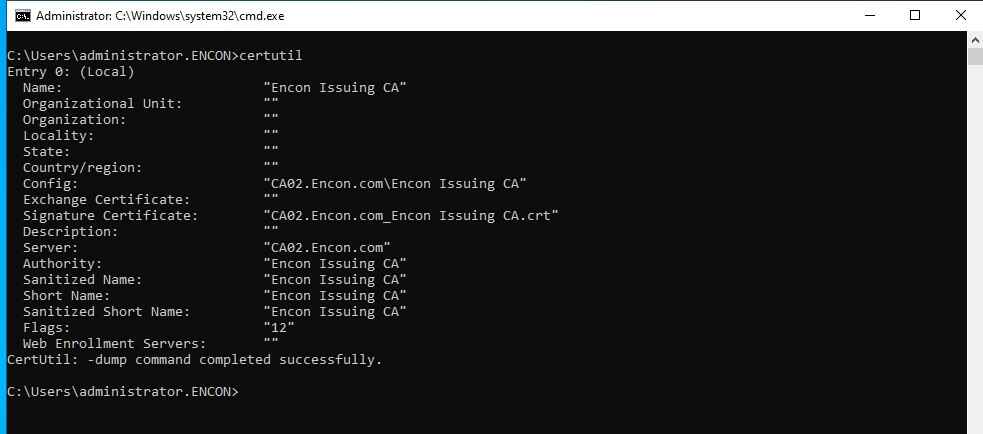
The certutil provides a wide range of switches, which can be explored using certutil -? or certutil
Well, you might be thinking about what major difference “-v” switch could make, so here is the output of a string compared between certutil -? and certutil -v -?
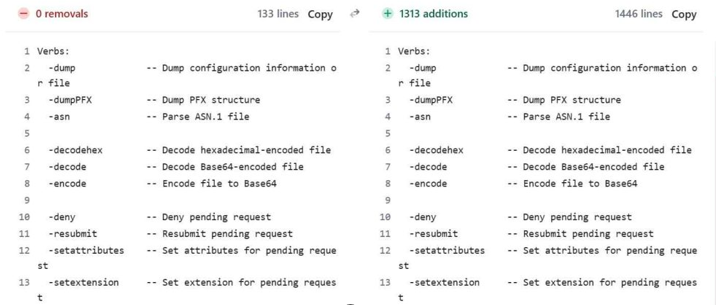
The left side shows the output of the command “certutil -?“, while the right side shows the output of the command “certutil -v -?“. The difference is immediately noticeable. The verbose output is significantly longer, expanding well beyond the concise list returned by certutil -?. While the default help focuses on commonly used commands with brief descriptions, adding the -v switch significantly expands the output to include additional commands and more detailed information. This clearly illustrates how much functionality within certutil.exe remains hidden unless verbose help is explicitly requested.
Exploring Hidden Switches of Certutil
The most complete way to explore everything certutil offers is with the following flag combination:
certutil -v -uSAGEThis combines verbose output (-v) with the extended usage view (-uSAGE), producing the most detailed help output with full syntax and additional commands not shown in standard help.
If you only need the list of hidden switch names without full syntax detail, the following command provides a quicker subset:
certutil -uSAGEIt is worth noting that both flags are case-sensitive and must be typed exactly as shown. Additionally, the hidden switches across both certutil and certreq are undocumented for a reason, as they may behave differently across Windows versions and fall outside the scope of standard Microsoft support. For this reason, it is always advisable to test them in a non-production environment before deploying them in any live or critical system.
Let us analyze the difference between the two in detail. On the left, we have the standard certutil -? output, while on the right we have the certutil -uSAGE output. The comparison clearly highlights additional hidden switches, which are not visible in the default help. These extra options are highlighted in green in the -uSAGE view for better identification.
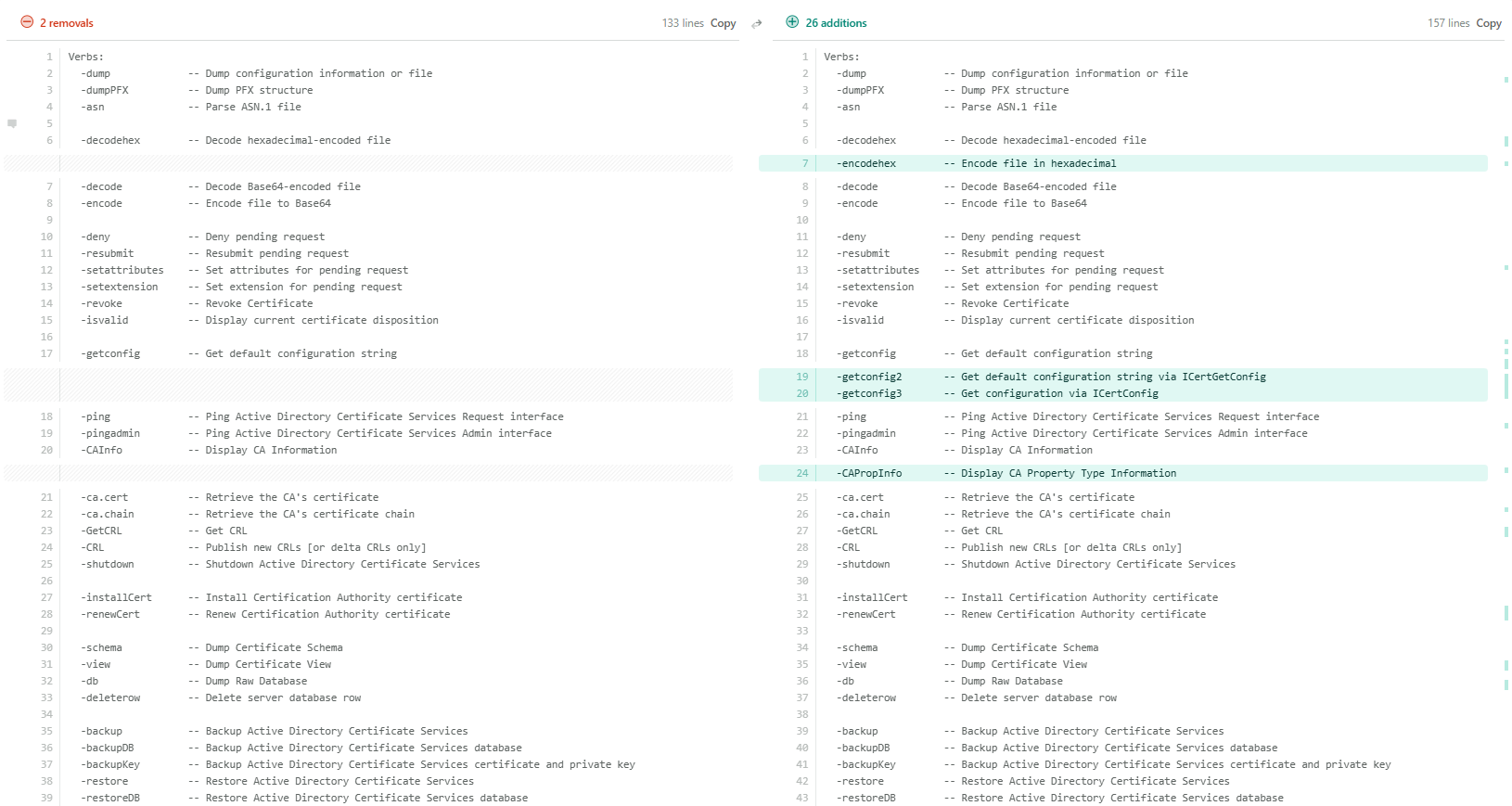
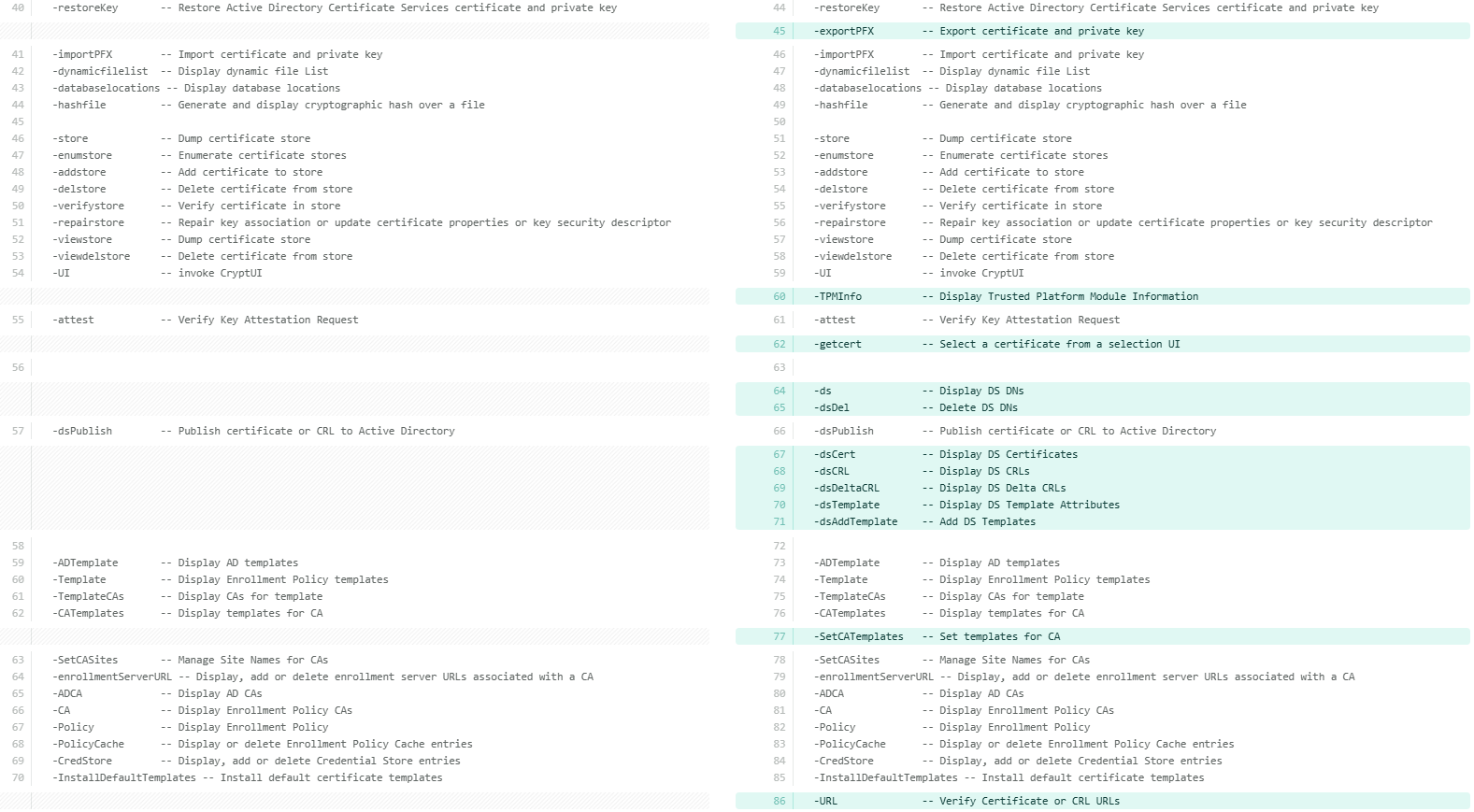
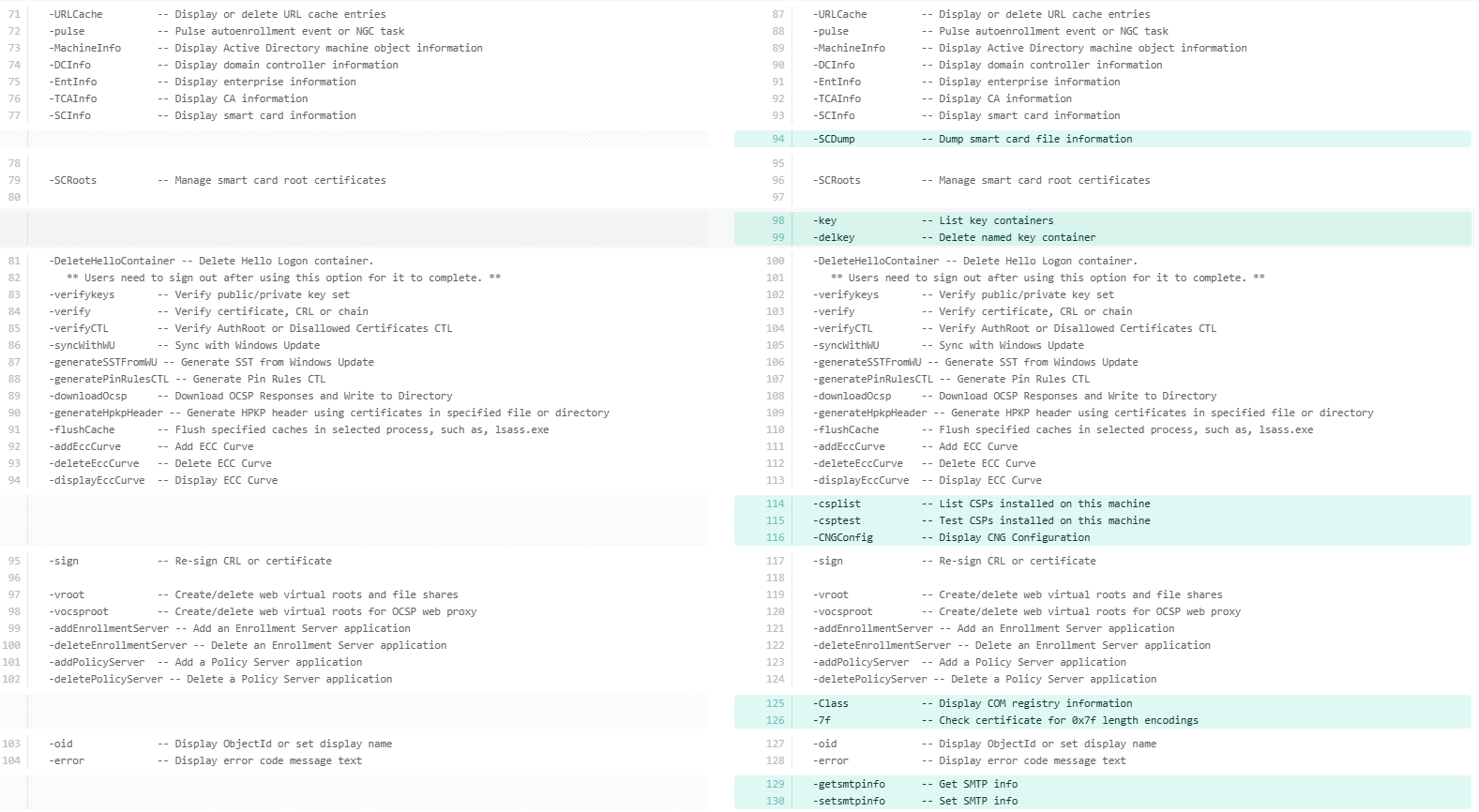
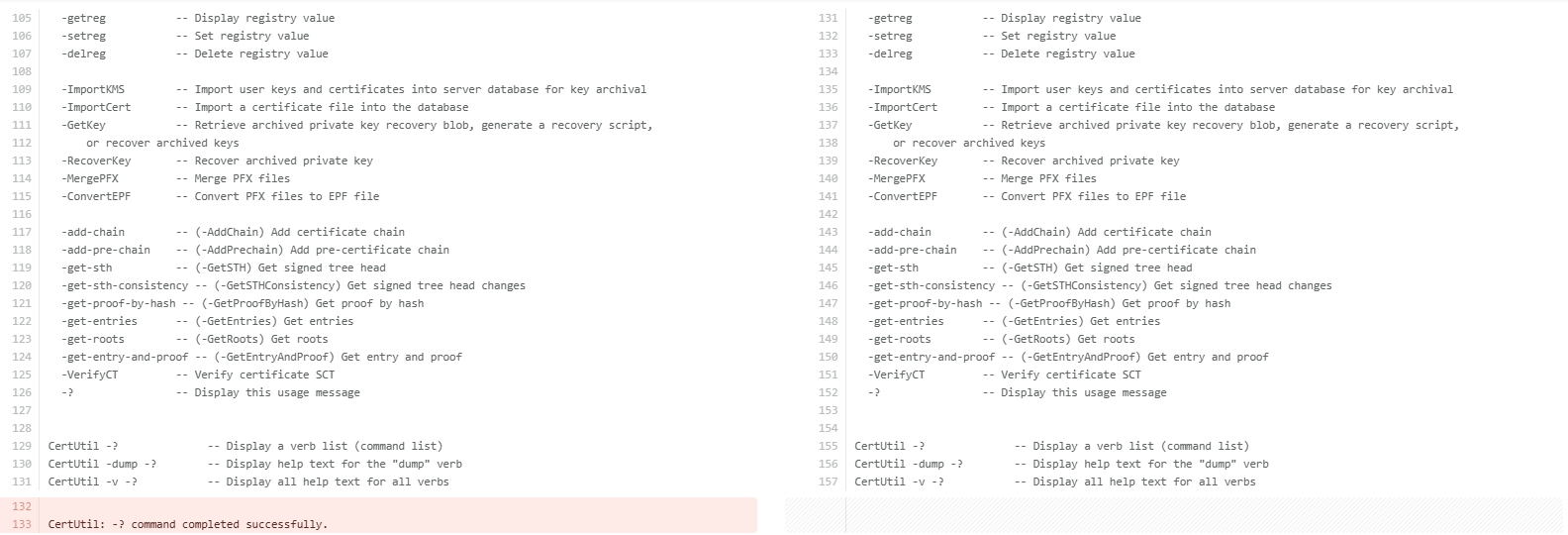
Now that the differences are clearly visible, let us understand each additional command available under certutil -uSAGE in detail. The following table breaks down each hidden switch and its purpose for better clarity.
| Parameter | Description |
|---|---|
| -encodehex | Encodes a file in hexadecimal format. |
| -getconfig2 | Gets the default CA configuration string via ICertGetConfig interface. |
| -getconfig3 | Gets CA configuration via the ICertConfig interface. |
| -CAPropInfo | Displays CA Property Type information, such as the data types and flags of every property the CA exposes. Used for advanced CA scripting. |
| -exportPFX | Exports a certificate and its private key to a PFX file. |
| -TPMInfo | Displays Trusted Platform Module (TPM) information. Shows TPM version, manufacturer, and capabilities, useful when deploying TPM-backed keys. Used for TPM-backed key and Virtual Smart Card (VSC) validation. |
| -getcert | Opens a certificate selection UI to pick a certificate interactively. The full syntax is certUtil [Options] -getcert [ObjectId | ERA | KRA [CommonName]] . |
| -ds | Displays Active Directory Distinguished Names (DNs) for PKI containers (AIA, CDP, etc.). Helps understand where PKI objects are stored in AD. |
| -dsDel | Deletes a specific entry from an Active Directory PKI container. Use with extreme caution as it removes AD objects permanently. |
| -dsCert | Displays certificates stored in Active Directory PKI containers. |
| -dsCRL | Displays CRLs (Certificate Revocation Lists) stored in Active Directory. |
| -dsDeltaCRL | Displays Delta CRLs stored in Active Directory. Used when a CA publishes incremental revocation lists. |
| -dsTemplate | Displays certificate template attributes from Active Directory. Add -v before it to fully expand enrollment flags, private key flags, issuance policies, and EKU OIDs. Used for template auditing and security review. |
| -dsAddTemplate | Adds certificate templates to Active Directory. Used during CA setup or when publishing new templates. |
| -SetCATemplates | Sets or restricts the list of templates a CA is allowed to issue. |
| -URL | Verifies certificate and CRL (Certificate Revocation List) URLs to ensure they are reachable and return valid data. Helps troubleshoot chain, CRL, and OCSP reachability issues. |
| -SCDump | Dumps smart card file information. Used for smart card login and provisioning issues. |
| -key | Lists all cryptographic key containers on the machine. Shows both CryptoAPI (legacy) and CNG key containers. |
| -delkey | Deletes a specific cryptographic key container from the machine (permanently). |
| -csplist | Lists all Cryptographic Service Providers (CSPs) and Key Storage Providers (KSPs) installed on the machine. Useful for verifying HSM/smart card provider availability. |
| -csptest | Tests a CSP/KSP by loading it and checking cryptographic operations. Commonly used for HSM and smart card troubleshooting. |
| -CNGConfig | Displays CNG (Cryptography Next Generation) configuration, such as registered algorithms, providers, and CNG settings. |
| -Class | Displays COM registry information for certificate-related COM classes. |
| -7f | Checks a certificate for 0x7f length encodings. |
| -getsmtpinfo | Displays SMTP(email) notification settings configured on the CA. |
| -setsmtpinfo | Configures SMTP notification settings on the CA such as set up email alerts for CA events like certificate issuance, expiration, or failures. |
Note: These commands operate at a sensitive administrative level. Improper use of switches like -dsDel, -delkey, or -SetCATemplates can impact certificate services, break trust chains, or remove critical PKI objects from Active Directory. Always verify the target and understand the impact before running them in a production environment.
That said, let us take a closer look at some of the most commonly used hidden switches, the ones that PKI administrators will find most useful in day-to-day operations and troubleshooting.
- -csplist and -csptest: These two work best together. Run -csplist first to see every CSP and KSP registered on the machine, then use -csptest to load and verify a specific provider. This is the fastest way to diagnose HSM or smart card issues: if the provider does not appear in -csplist, the driver is not registered; if it appears but -csptest fails, the issue is permissions, PIN, or library path. Each switch can also be expanded individually for more detail:
certutil -v -csplist -? certutil -v -csptest -? - -dstemplate with -v: Adding -v before -dstemplate makes a significant difference. Without it, you get template names. With it, you get the full expansion, including enrollment flags, private key flags, issuance policies, and EKU OIDs. This is the command to run when auditing templates for security misconfigurations:
certutil -v -dstemplate
certutil -v -dstemplate WebServer
Another thing worth knowing is that every hidden switch, just like public ones, can be expanded individually. This works for any switch in the -uSAGE list:
certutil -URL -?
certutil -v -SCDump -?
Taken together, these switches give PKI administrators a level of visibility and control that simply is not available through the MMC console or standard certutil help. The more familiar you are with them, the faster you will be able to diagnose and resolve issues in your PKI environment.
Certreq.exe
Certreq.exe is a powerful command-line tool built into Windows for managing the full certificate enrollment lifecycle. While certutil.exe handles certificate inspection and CA administration, certreq.exe focuses on the request side: generating, submitting, retrieving, and installing certificates from a CA.
To visit the official documentation, follow the link: certreq documentation
Exploring Certreq
At its core, certreq.exe is the bridge between a certificate requester and a CA. It handles every stage of the enrollment workflow from a single command-line interface, making it especially valuable in server environments where GUI-based enrollment is unavailable or impractical.
Here is what certreq can do and how each capability fits into real-world PKI operations:
- Request a certificate from a CA: Using an INF policy file, certreq generates a Certificate Signing Request (CSR) and private key pair. The INF file defines the subject, key algorithm, key size, intended usage, and any requested extensions, giving administrators precise control over what gets requested.
certreq -new request.inf request.csr - Submit a request to a CA: Once a CSR is ready, certreq submits it directly to an enterprise CA over RPC/DCOM or to an external CA via a file. The -config flag specifies which CA to target when multiple CAs exist in the environment.
certreq -submit -config "ServerName\CAName" request.csr issued.cer - Retrieve a pending certificate: When a CA requires manager approval, the certificate is not issued immediately. certreq can poll the CA and retrieve the issued certificate once it has been approved, using the request ID returned at submission time.
certreq -retrieve -config "ServerName\CAName" issued.cer - Accept and install the issued certificate: After retrieval, certreq installs the certificate into the appropriate Windows certificate store and links it to its private key, completing the enrollment process.
certreq -accept issued.cer - Create a cross-certification or qualified subordination request: For organizations building PKI hierarchies, certreq can construct cross-certification requests from an existing CA certificate. This is used when establishing trust between two independent PKI hierarchies or when creating a qualified subordinate CA with constrained name spaces and policy constraints.
- Sign a cross-certification or qualified subordination request: certreq can also sign a pending cross-certification request using an existing CA certificate, completing the trust establishment between PKI hierarchies without needing the MMC CA console.
Certreq Command Parameters
| Parameter | Description |
|---|---|
| -submit | Submits a request to a certificate authority |
| -retrieve | Retrieves a response to a previous request from a certificate authority |
| -new | Creates a new request from an .inf file |
| -accept | Accepts and installs a response to a certificate request |
| -policy | Sets the policy for a request |
| -sign | Signs a cross-certification or qualified subordination request |
| -enroll | Enrolls for or renews a certificate |
| -? | Displays a list of certreq syntax, options, and descriptions |
| Displays help for the parameter specified | |
| -v -? | Displays a verbose list of the certreq syntax, options, and descriptions |
Among these, -submit and -retrieve are the most frequently used switches to submit a certificate request and retrieve the issued certificates from Certificate Authority via the command line.
Exploring Hidden Switches of Certreq
Just like certutil, certreq has its own set of hidden switches, revealed using the same case-sensitive -uSAGE parameter:
certreq.exe -uSAGEThe screenshots below compare the certreq -? output on the left with the standard certreq -uSAGE output on the right. The additional hidden switches are visible only on the right.
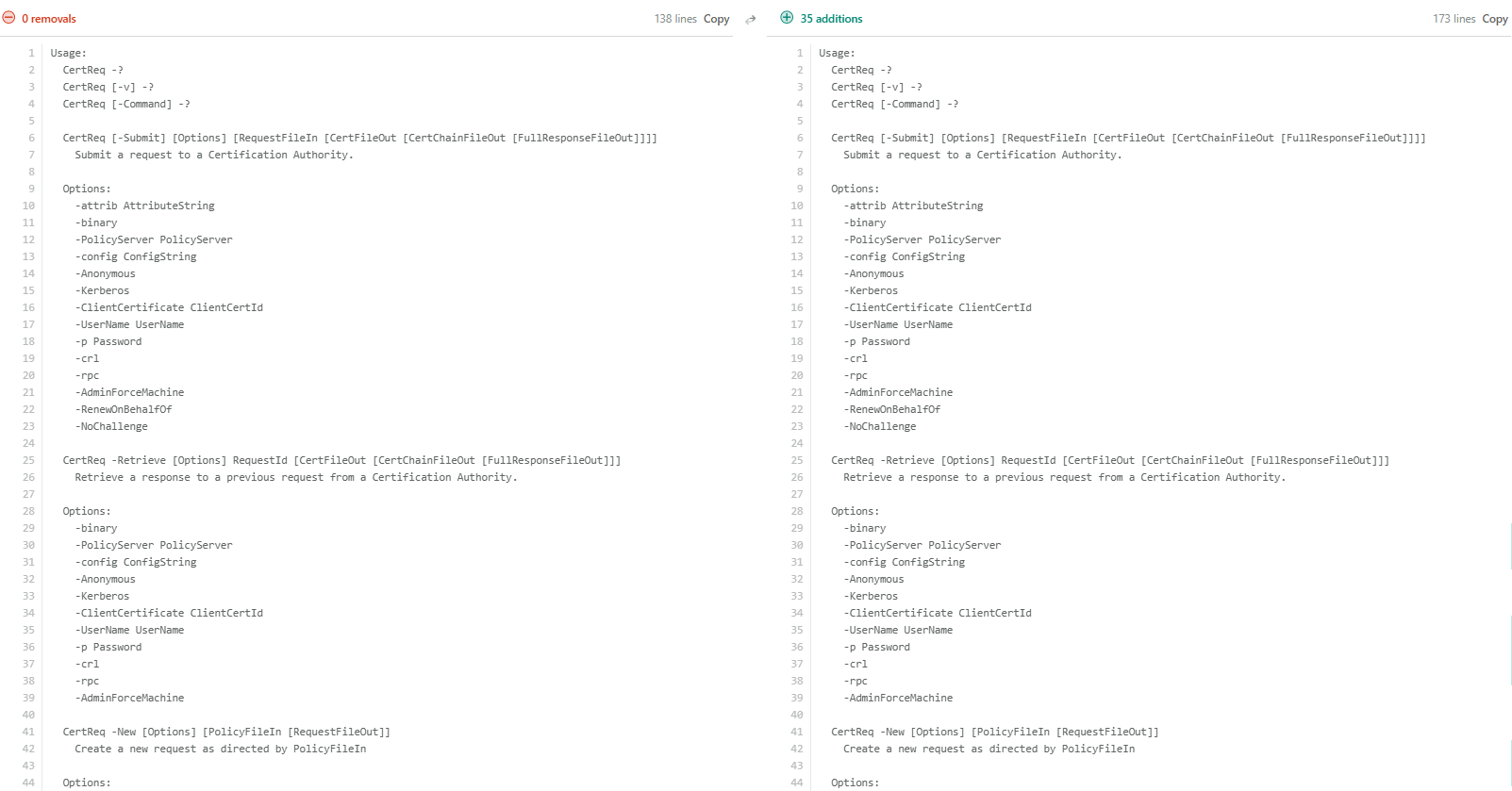
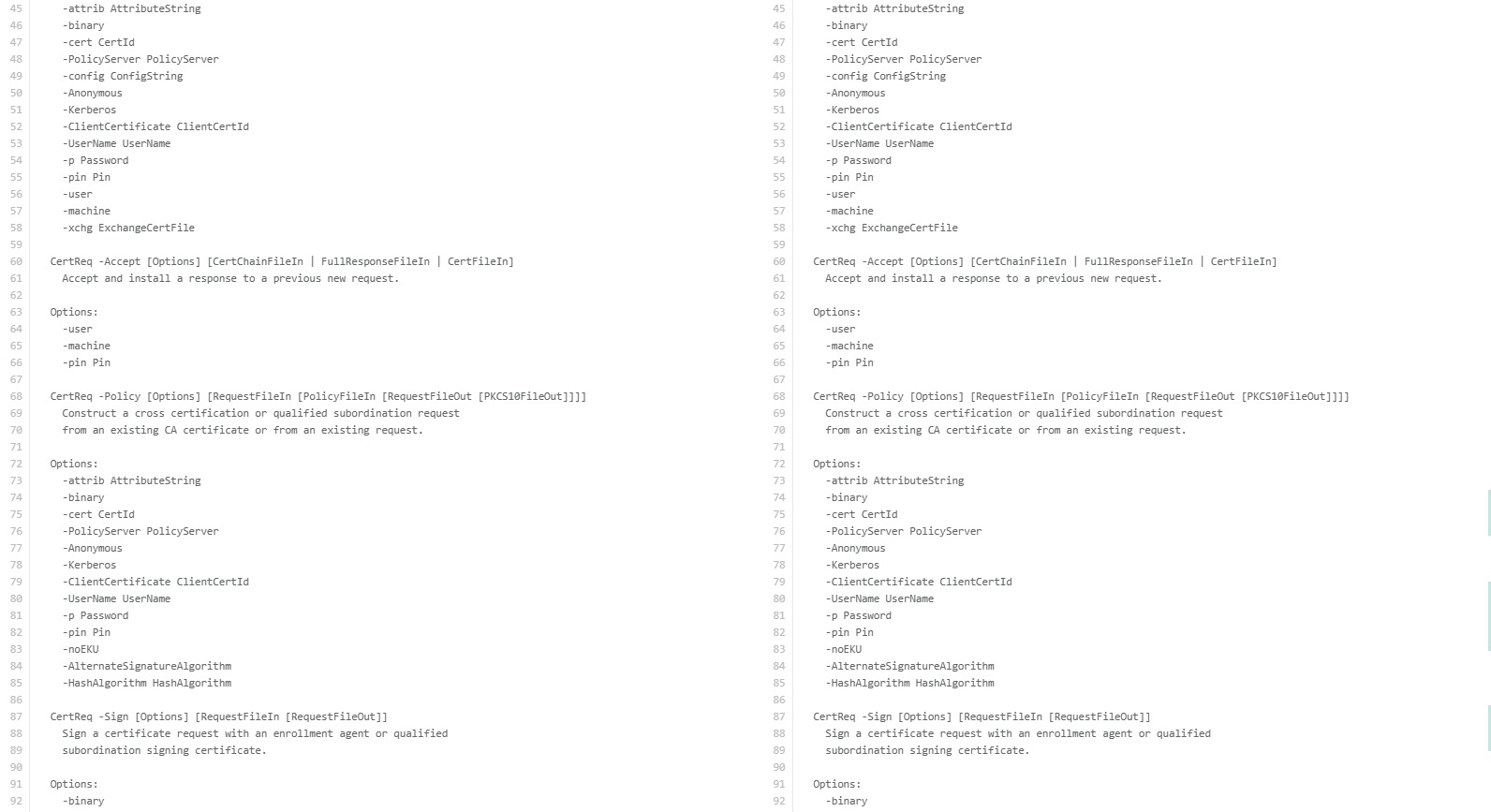
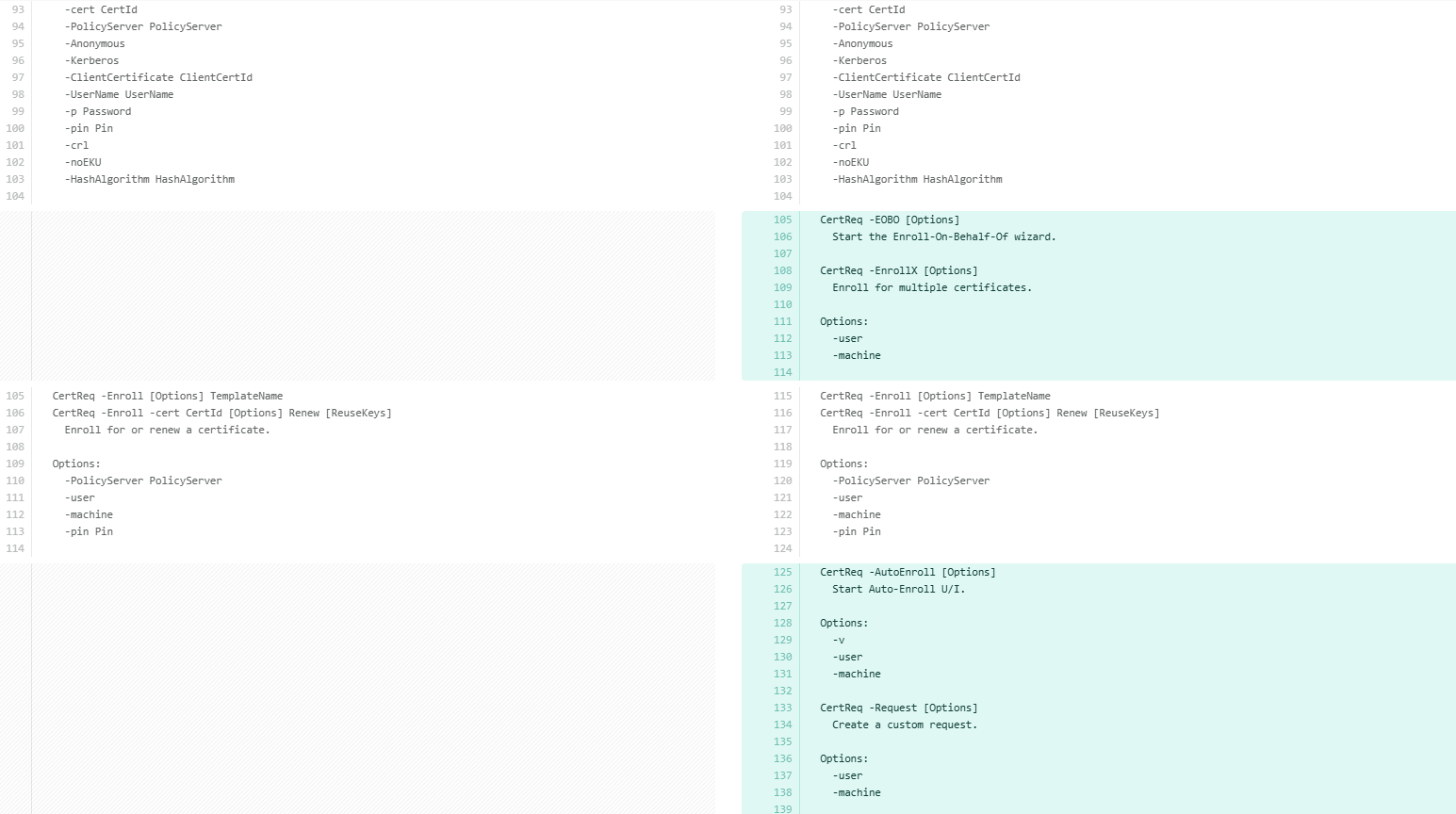
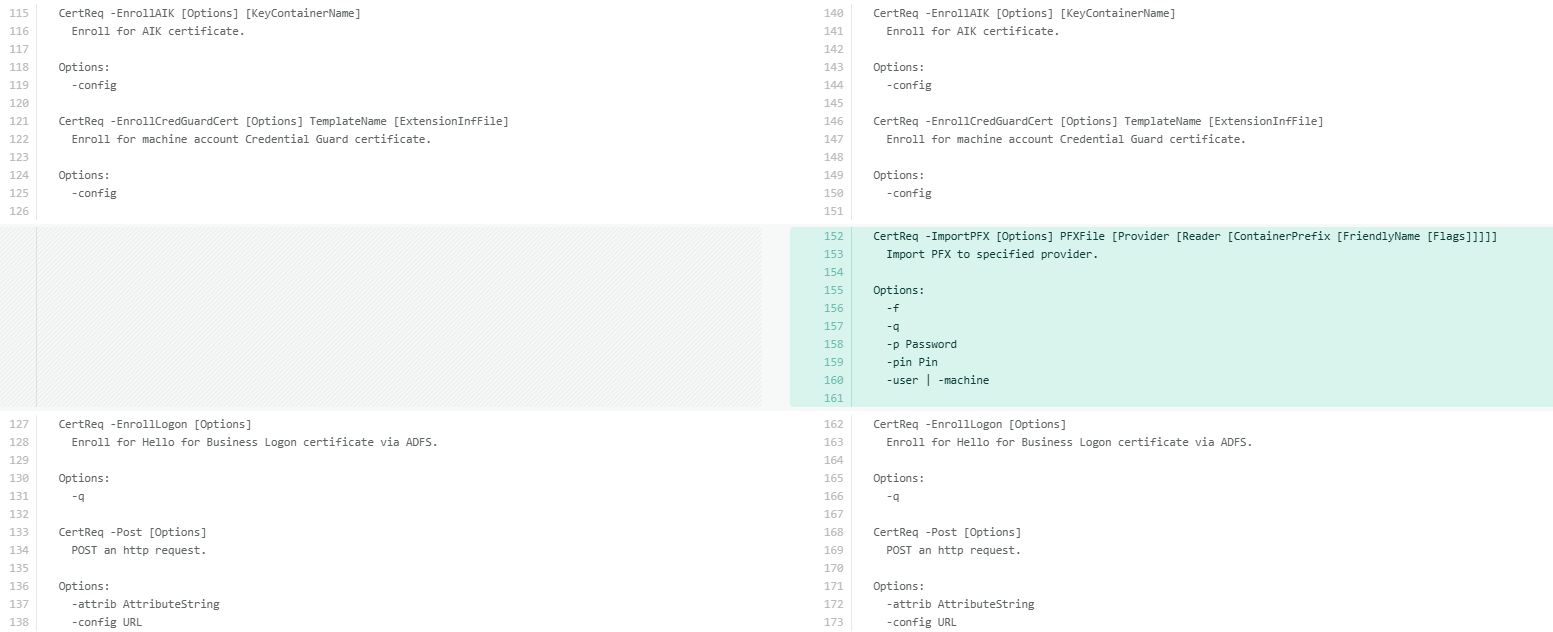
With the differences established, let us examine each additional command available under certreq -uSAGE in detail. The following table breaks down each hidden switch and its purpose for better clarity.
| Hidden Switch | What It Does |
|---|---|
| -EOBO | Starts the Enroll-On-Behalf-Of wizard. Allows an enrollment agent to request certificates on behalf of another user. Requires an enrollment agent certificate to be configured. |
| -EnrollX | Enrolls for multiple certificates in a single operation. Accepts -Accept user and -machine flags to control the target certificate store. |
| -AutoEnroll | Starts the Auto-Enroll UI. Supports -v, -user, and -machine flags. |
| -Request | Creates a custom certificate request with extended control over request content. Supports -user and -machine context flags. |
| -ImportPFX | Imports a PFX file directly to a specified cryptographic provider, including hardware providers like HSMs and smart cards. |
Each of these can be expanded individually for full syntax:
certreq -ImportPFX -?
certreq -AutoEnroll -?
certreq -EOBO -?
Of these, -ImportPFX deserves a closer look, particularly because of how it differs from its counterparts in certutil.
-ImportPFX in Certreq vs -importPFX in Certutil
Of all the hidden switches, certreq -importPFX and certutil -importPFX are particularly interesting to examine. Although both work with PFX files, they serve different purposes and behave quite differently in practice.
The key difference is in how they target the destination. certutil -importPFX operates against named Windows certificate stores and offers a rich modifier list, including AT_SIGNATURE, AT_KEYEXCHANGE, NoExport, NoChain, NoRoot, Protect, ProtectHigh, Pkcs8, VSM, and more, giving fine-grained control over exactly how the certificate and key are imported.
certutil [options] -importPFX [CertificateStoreName] PFXFile [Modifiers]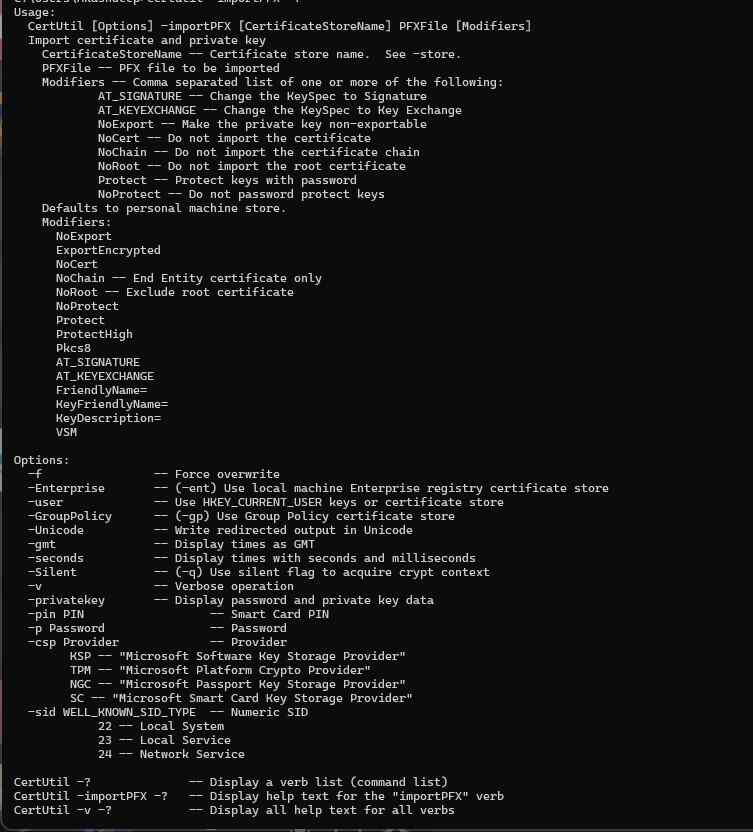
certreq -ImportPFX, on the other hand, targets a specific cryptographic provider directly by name, including hardware providers like HSMs and smart card readers. Its syntax is positional rather than modifier-based:
certreq -ImportPFX PFXFile [Provider [Reader [ContainerPrefix [FriendlyName [Flags]]]]]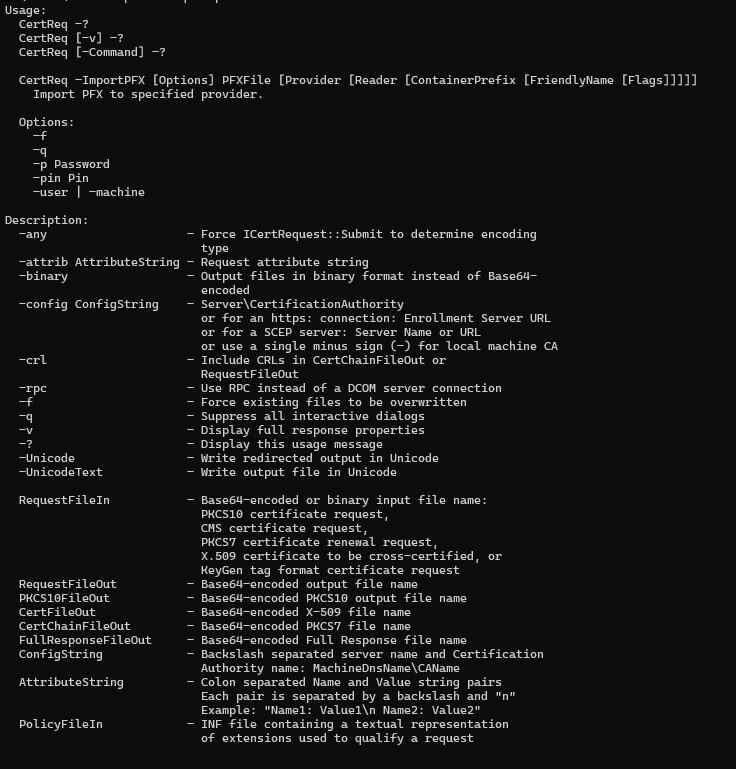
Note: The -importPFX option in certutil is a fully documented and supported switch. In contrast, -ImportPFX in certreq is not listed in standard help output and is considered an undocumented or lesser-known capability. Use the latter with caution and always validate behavior in non-production environments.
In practice, use certutil -importPFX for standard Windows certificate store imports where modifier control matters. Use certreq -ImportPFX when importing directly into a named hardware provider, an HSM KSP, or a specific smart card reader.
How Encryption Consulting Can Help
Encryption Consulting provides specialized services tailored to identify vulnerabilities and mitigate risks through PKI Services. Our strategic guidance aligns PKI solutions with organizational objectives, enhancing efficiency and minimizing costs. By partnering with Encryption Consulting, organizations can unlock the full potential of PKI solutions, realizing tangible financial benefits while maintaining strong security measures.
Encryption Consulting’s PKIaaS provides a flexible and secure PKI solution tailored to your specific needs, offering benefits such as customizable options, high assurance standards, and a low-risk managed approach. PKIaaS automates key and certificate management tasks, reducing operational overhead and minimizing the risk of human error. Additionally, it enhances network visibility by requiring certificates for access. It will take care of building the PKI infrastructure to lead and manage the PKI environment (cloud, hybrid, or on-premises) of your organization.
CertSecure Manager has a comprehensive suite of lifecycle management features. From discovery and inventory to issuance, deployment, renewal, revocation, and reporting, CertSecure provides an all-encompassing solution. Intelligent report generation, alerting, automation, automatic deployment onto servers, and certificate enrollment add layers of sophistication, making it a versatile and intelligent asset. For complete cryptographic visibility across all PKI environments including cloud-native and hybrid CA sources, CBOM Secure builds the cryptographic bill of materials that complements certutil and certreq command-line diagnostics with a continuous, automated inventory layer.
Conclusion
Certutil and certreq are powerful tools for managing certificates in Windows environments. Even though their fundamental functions are widely recognized, delving into their sophisticated features and hidden switches reveals a wealth of advanced capabilities.
These tools offer a level of visibility and control over certificate management that goes well beyond what the MMC console provides. Server administrators who invest time in understanding certutil and certreq’s full capabilities, particularly the hidden switches exposed through -uSAGE, will find themselves diagnosing and resolving PKI issues significantly faster. If managing and securing your certificate infrastructure requires deeper expertise, Encryption Consulting’s PKI team is here to help.
Frequently Asked Questions
Both certutil.exe and certreq.exe expose a significantly deeper set of capabilities through the case-sensitive -uSAGE flag that are completely invisible in standard help output. Certutil reveals 24 additional hidden switches covering Active Directory PKI container management, HSM and smart card diagnostics, CNG configuration, and CA notification settings. Certreq reveals 5 additional switches including -ImportPFX for direct hardware provider import. These switches give PKI administrators a level of visibility and control not available through the MMC console or standard help.
Enterprise PKI teams managing Microsoft AD CS environments regularly face troubleshooting scenarios that standard certutil and certreq help does not address: HSM provider registration failures, certificate template security audit, Active Directory PKI container inspection, and CNG configuration review. The hidden switches documented in this guide provide the exact diagnostic and administrative capabilities needed for these scenarios. As certificate validity shrinks to 47 days by March 2029 under CA/Browser Forum Ballot SC-081v3, PKI teams need faster and more precise tooling to diagnose and resolve enrollment and CA health issues at a higher renewal cadence.
Without knowledge of the hidden switches, PKI administrators face: slower incident resolution because diagnostic switches like -csplist, -csptest, -URL, and -dstemplate are unknown; HSM and smart card troubleshooting conducted through trial and error; certificate template security audits that miss the verbose flag expansion needed to surface enrollment flags and EKU OIDs; and use of certutil -importPFX for hardware provider imports when certreq -ImportPFX is the correct tool for targeting a named HSM KSP or smart card reader. Dangerous switches like -dsDel, -delkey, and -SetCATemplates can also be run without understanding their permanent and irreversible impact on Active Directory PKI objects.
PKI admins own day-to-day certutil and certreq command-line operations: CA health checks, template audits via -v -dstemplate, CRL and AIA validation via -URL, database cleanup, and HSM diagnostics via -csplist and -csptest. Security architects own the policy governing which hidden switches are approved for production use and which require change control (particularly -dsDel, -delkey, and -SetCATemplates). Active Directory teams own PKI container object management and should be involved whenever -ds, -dsDel, -dsCert, -dsCRL, or -dsTemplate switches are used. Compliance teams own audit evidence that CA configuration changes were performed via authorized switches with documented before/after state.
Certutil and certreq hidden switches are the diagnostic and administrative layer that supports certificate lifecycle management in Microsoft AD CS environments. The -dstemplate switch surfaces the template configuration that governs what certificates CLM platforms like CertSecure Manager can enroll for and renew. The -URL switch validates the CRL and AIA reachability that CLM health monitoring depends on. The -csplist and -csptest switches verify the HSM provider availability that CLM-integrated hardware key protection requires.
Key metrics: mean time to diagnose and resolve AD CS enrollment failures (target: under 30 minutes for PKI admins familiar with -csplist, -csptest, -URL, and -dstemplate); percentage of certificate template security audits that include -v -dstemplate verbose expansion (target: 100%); and percentage of HSM-related enrollment failures diagnosed using -csplist and -csptest before escalating to vendor support (target: 100%). Organizations should also track whether -dsDel, -delkey, and -SetCATemplates have formal change control requirements defined.
Monitor continuously: CA audit logs for use of administrative switches that modify CA configuration (-setreg, -SetCATemplates, -dsDel, -delkey); and certificate template changes via Event ID 4899/4900 in the CA audit log. Audit quarterly: run certutil -v -dstemplate against all published templates and compare against the approved baseline; run certutil -csplist to confirm HSM and smart card providers are registered; and run certutil -URL against all AIA and CDP URLs to confirm CRL and OCSP reachability.
In hybrid environments, certutil and certreq operate only against the on-premises AD CS layer and do not apply to cloud-native CA APIs. For cryptographic inventory across all CA sources in hybrid environments, CBOM Secure provides the cross-environment visibility that certutil alone cannot deliver. In multi-CA environments with multiple issuing CAs, the -dstemplate and -SetCATemplates switches must be run against each CA individually, since template publication is CA-specific. Organizations evaluating a managed CA layer can use PKI as a Service alongside on-premises AD CS for hybrid coverage.
Prerequisites: administrative privileges on the target Windows Server; for CA-related switches, Active Directory Certificate Services must be installed and the user must have CA administrator rights; for HSM-related switches (-csplist, -csptest, certreq -ImportPFX), the HSM or smart card vendor driver must be registered as a CSP or KSP; both -uSAGE and -v flags are case-sensitive and must be typed exactly as shown; and all hidden switches should be tested in a non-production environment before use in a live CA, since they are undocumented and may behave differently across Windows Server versions.
Common errors: -uSAGE returning standard help output because the flag was typed in lowercase (-usage instead of -uSAGE); certutil -csptest failing with access denied or provider not found because the HSM driver is not registered as a KSP (verify with -csplist first); certutil -dsDel permanently removing an AD PKI object without a recovery path because no backup was taken before the operation (always run certutil -backupDB and export relevant AD PKI objects before using -dsDel, -delkey, or -SetCATemplates); and certutil -importPFX being used when certreq -ImportPFX was required because the destination is a named HSM KSP rather than a Windows certificate store.

Every Layer of Cryptography.
One Team to Secure It.
See how Encryption Consulting secures what your enterprise depends on, from assessment through deployment.
Request a Demo